
Table of Contents
An Honest Look at Elementor vs Gutenberg in 2026
What Are Gutenberg and Elementor?
What Elementor is Actually Doing to Your Site
Where Gutenberg Wins Over Elementor in WordPress Websites
A Clear Gutenberg vs Elementor Comparison (Key Differences at a Glance)
When Elementor Is the Right Choice for WordPress Websites
Choosing the Right Migration Strategy: Gutenberg vs Elementor Transition Approaches
Elementor vs Gutenberg: when it’s time to leave Elementor behind

An Honest Look at Elementor vs Gutenberg in 2026
Elementor deserves credit as it democratised web design at a time when Gutenberg was rough, limited, and frustrating to work with. For non-developers who needed pixel-level control without writing a line of code, it was genuinely transformative.
But this is 2026, and the WordPress landscape has shifted considerably. After building and optimising WordPress sites professionally, observing what Elementor does to performance at scale, and watching clients inherit maintenance problems they never knew they were signing up for, we have reached a clear conclusion: for most new projects, Gutenberg is the stronger foundation and for many existing Elementor sites, the case for migrating from elementor to gutenberg is growing harder to ignore.
That conclusion is not a vendor preference. It is built on evidence, and the sections below lay out what that evidence actually looks like.
What Are Gutenberg and Elementor?
Gutenberg is the default block editor built directly into WordPress core. Introduced in WordPress 5.0, it is maintained by the same team that develops WordPress itself. Pages and posts are created using reusable “blocks” (text, images, buttons, columns, galleries, etc.), and the content is stored largely as clean HTML block markup inside the standard WordPress content field. Because it is native to the platform, Gutenberg tends to be lighter, faster, and more compatible with themes, plugins, SEO tools, and future WordPress updates.
Elementor, by contrast, is a third-party visual page builder plugin layered on top of WordPress. It includes its own drag-and-drop design interface, widget ecosystem, styling engine, responsive controls, animations, templates, and layout system. That flexibility makes it popular with designers, marketers, and agencies who want pixel-level visual control without coding. However, Elementor also introduces an additional abstraction layer: more scripts, more DOM elements, more CSS generation, and its own internal data structure. Those tradeoffs can affect performance, maintainability, accessibility, and long-term portability if not managed carefully.

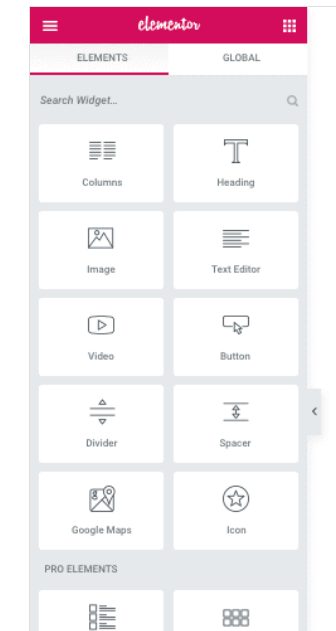
What Elementor is Actually Doing to Your Site
Most site owners see Elementor as a design tool. What they don’t see is what it is doing under the hood on every page load.
1. Excessive DOM Size from Nested Elementor Structure (DOM Bloat Impact)
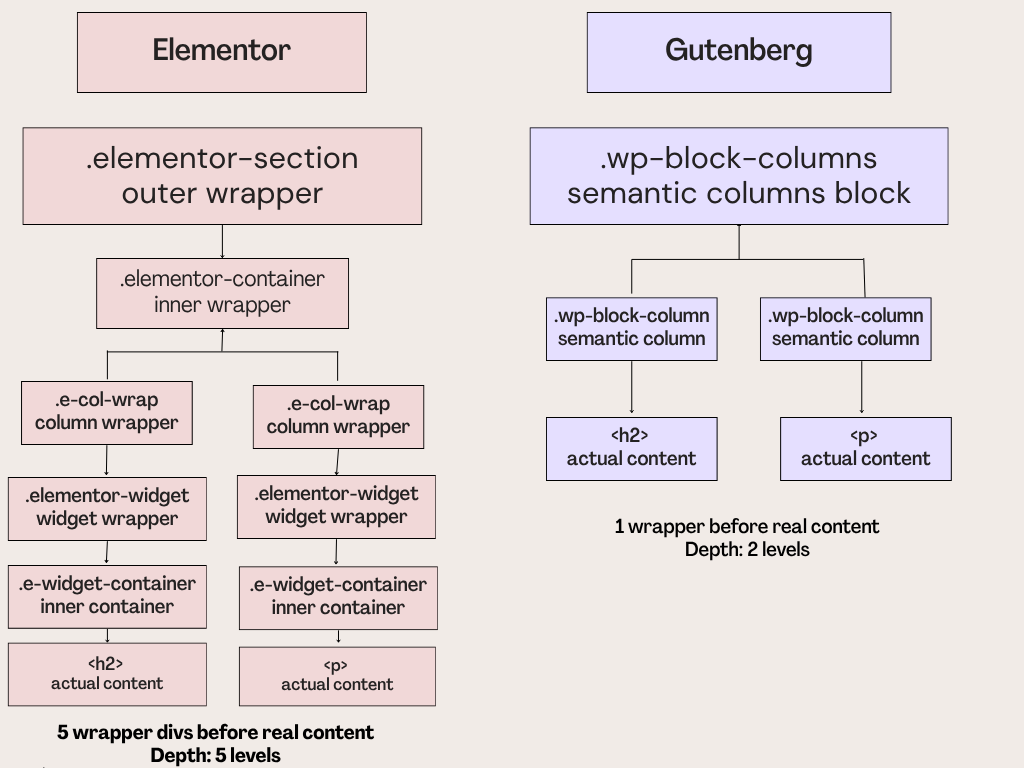
Elementor’s nested widget structure generates significantly more HTML markup than the same layout built in Gutenberg. Every section, column, and widget adds wrapper elements that exist purely to serve Elementor’s layout engine carrying no semantic value for the browser. On a complex page, this results in a DOM (Document Object Model) far larger than it needs to be. The browser has to parse, style, and render every one of those elements. It shows up directly in PageSpeed scores and Core Web Vitals.
2. Heavy JavaScript Load and Its Effect on Core Web Vitals (TBT & Interactivity Issues)
Elementor loads a substantial JavaScript payload on every page it controls. Much of this is framework-level code required to make the builder’s widget system function code, that has no purpose whatsoever once the page is published and being viewed by a real visitor. This JavaScript must be downloaded, parsed, and executed before the page becomes fully interactive. The result is poor Total Blocking Time, one of the Core Web Vitals metrics that directly influences search rankings.
3. Global CSS and JavaScript Loading Across the Entire Website
Elementor loads its CSS and JavaScript across the entire site including on pages and post types where it is not being used at all. A blog post written in the classic editor still carries Elementor’s full frontend asset stack if Elementor is active. That is dead weight on every non-Elementor page, on every single visit.
Elementor’s frontend CSS is roughly 80–120KB minified; its JS ~150–200KB. On a blog with 500 posts written in the classic editor, every single post still loads ~300KB of Elementor assets. At 10,000 monthly visits to blog posts × 300KB = ~3GB/month of wasted data transfer, serving assets that do absolutely nothing for those pages.
4. Post Meta Bloat and Database Overhead from Elementor Page Data
Every page built in Elementor stores its entire design: every widget, every setting, every style override as serialised data in the WordPress post meta table. On sites with many Elementor pages, this accumulates into a database significantly heavier than it needs to be, affecting query performance and backup sizes.This is a pattern common to third-party visual builders that operate outside WordPress’s native content field like Divi, WPBakery, and others share it. But it is notably absent in Gutenberg, which stores content in the standard post field where it belongs.
5. Elementor Add-ons and How They Multiply Performance and Asset Load Issues
Each Elementor addon adds its own CSS and JavaScript to the pile often loaded globally regardless of whether the widget it provides appears on the current page. A site running Elementor with four or five addon plugins carries the weight of five separate asset footprints on every page load, without exception. The problems above do not add they multiply.
Where Gutenberg Wins Over Elementor in WordPress Websites
Our position, based on what we see in practice, is clear: for most business and media sites, Gutenberg is already the better choice. Not because Elementor is bad but because the foundation matters, and Gutenberg’s foundation is structurally better.
1. Performance- First Architecture With Clean, Lightweight Code Output
Gutenberg outputs clean, semantic HTML with minimal markup and no unnecessary wrapper elements. Combined with a lightweight theme, it consistently delivers better performance than equivalent Elementor builds across all Core Web Vitals, including LCP, Total Blocking Time, and CLS. Its JavaScript footprint is significantly smaller, reducing both page weight and browser processing overhead. This is not a minor optimization. It is a fundamental architectural advantage that delivers immediate performance benefits and continues to scale efficiently over time.
2. Native WordPress Integration and Full Site Editing Compatibility
As Gutenberg is built into WordPress itself, it automatically benefits from core performance improvements and new platform features like Full Site Editing. It also avoids many of the compatibility and maintenance issues that third-party builders face with major WordPress or PHP updates. Since Gutenberg content is stored in the standard WordPress content field, developers can work with it easily without relying on a proprietary system.
3. A Mature Block Editor Experience for Modern Website Building
There was a time when Gutenberg felt noticeably behind Elementor in usability and design flexibility. That’s no longer true for most websites. For teams managing pages, blog posts, and everyday site content, the block editor is now fast, intuitive, and capable enough for real production use.
With Full Site Editing, Gutenberg can now handle headers, footers, templates, and global layouts directly inside WordPress without relying on a third-party builder. The gap that once made Elementor feel necessary for modern site building has become much smaller.
A Clear Gutenberg vs Elementor Comparison (Key Differences at a Glance)
| Aspect | Elementor | Gutenberg |
| Performance | Bloated DOM, heavy JS, global assets on every page | Clean HTML, minimal JS, loads only what’s needed |
| WP alignment | Third-party plugin – separate release cycle, compatibility risks | WordPress native – maintained by core team |
| Content portability | Proprietary format in post meta-locked to the builder | Standard block markup – readable by any developer |
| Core Web Vitals | Poor LCP, TBT, CLS on complex pages | Strong across all three with a lightweight theme |
| Full Site Editing | Separate template system, outside WP FSE | Native FSE- headers, footers, templates built in |
| Addon ecosystem | Powerful but each addon adds global CSS/JS weight | Growing core block library, lower overhead per feature |
| Design flexibility | Highest – pixel control without developer involvement | Strong for most use cases; complex layouts need custom blocks |
When Elementor Is the Right Choice for WordPress Websites
A fair comparison also means acknowledging where Elementor genuinely performs better. For clients or teams that need highly visual, pixel-perfect landing pages without relying on developers, Elementor still offers a level of design freedom that Gutenberg’s block system does not fully match yet. Its drag-and-drop interface makes it easier for marketers, designers, and non-technical teams to experiment with layouts, animations, and custom page designs directly inside the editor.
If the main goal is giving a marketing team the ability to build campaign pages independently with maximum visual flexibility and fast iteration taking priority over performance, Elementor can absolutely be the right tool for the job.
The real question is whether that describes the kind of website you are building. For most business websites, publishing platforms, and content-driven sites where speed, SEO, stability, and long-term maintainability matter, that usually is not the primary requirement.
Choosing the Right Migration Strategy: Gutenberg vs Elementor Transition Approaches
The right migration approach depends primarily on site size and complexity, so it is worth being specific about what those terms mean in practice.
For sites with roughly 20 or fewer Elementor-built pages, a full rebuild in Gutenberg is usually the cleanest path. The scope is manageable, the content rebuild is straightforward, and eliminating Elementor entirely removes all associated overhead in one step. You arrive at a clean codebase with no legacy builder debt and a measurable performance improvement from day one.
For larger sites typically those with 50 or more Elementor pages, complex custom templates, or significant WooCommerce or post-type integrations, a full rebuild is rarely practical in a single phase. A page-by-page migration, prioritising the highest-traffic and most business-critical pages first (homepage, key landing pages, top-performing content), allows performance improvements to become measurable quickly while the broader migration continues in the background.
Sites that fall in between, or that have mixed content where some sections were built in Elementor and others were not, often move through a transitional hybrid state: Elementor remains active for specific templates while new content is created in Gutenberg. This reduces but does not eliminate Elementor’s performance overhead. It is a bridge, not a destination.
In every case, the right approach balances the site’s current state, the available budget, the client’s timeline, and the performance gains that need to be achieved.
Read More : If you are planning a migration, this detailed Elementor to Gutenberg conversion guide breaks down the complete process, including content rebuilding strategies, performance considerations, and common pitfalls to avoid during the transition.
Key Signs It’s Time to Move from Elementor to Gutenberg
Based on what we see across client sites, these are the clearest indicators that the time to migrate has arrived:
- PageSpeed scores are consistently poor and structural: caching and server-level optimisations have been applied, but scores remain low from 60 -75 (elementor) vs 85-90 (gutenberg) because the problem is architectural, not environmental. Sites that have grown significantly since launch often reach this point as traffic and page count scale beyond what the original Elementor setup can carry efficiently.
- The site is running multiple Elementor addon plugins that are infrequently updated, compounding every performance and security risk.
- Developers are spending significant time working around Elementor’s limitations rather than building features.
- A WordPress or PHP version upgrade is being delayed because of Elementor or addon compatibility concerns.
- The content team finds the editor slow, unstable, or difficult to work in day to day.
- The business is planning a redesign anyway, making it the natural moment to change the foundation as well.
Any one of these is worth a conversation. Several of them together is a clear signal.
Final Verdict: Elementor vs Gutenberg
The concerns around Elementor in 2026 aren’t subjective, they show up in measurable technical outcomes, from PageSpeed reports and database bloat to the extra friction and delays that often follow routine updates.
Elementor solved a real problem at a specific moment in WordPress’s history. That moment was roughly between 2018 and 2022, when Gutenberg was still maturing and Full Site Editing did not yet exist. During that window, Elementor filled a genuine gap. That gap has since closed. From WordPress 6.0 onwards, Gutenberg introduced Full Site Editing, bringing headers, footers, and global templates into the native editor. The block library has matured, the performance architecture is structurally cleaner, and the content it produces is readable and maintainable by any developer without builder knowledge.
The practical conclusion is straightforward. If you are starting a new WordPress project in 2026, build on Gutenberg. If you are running an existing Elementor site, the right question is not whether to migrate, but when and how. WordPress is moving in one direction, and the performance, maintainability, and long-term stability advantages of building on that foundation only compound the longer the decision is deferred. Elementor had its moment. For most serious WordPress sites, that moment has passed.

Leave a Reply
Articles
Related Insights.
Blogs and Resources on WordPress, WooCommerce, SEO and Marketing

Leave a
Comment.